


Choose how products appear
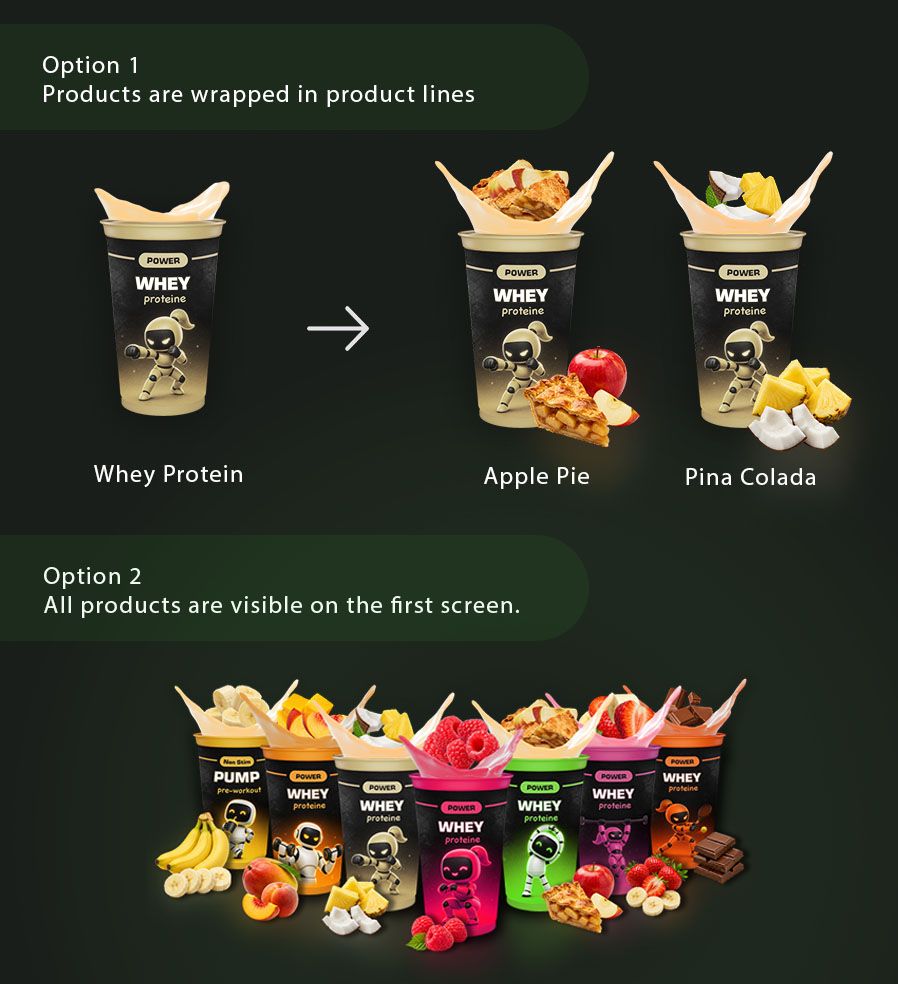
In machine settings turn on Group products by product line to show one cup for each product line on the first kiosk screen. Customers select the cup first, then choose a product (flavor + brand) on the second scene. For example, Apple Pie and Pina Colada can both appear inside the Whey Protein product line, even when products come from different brands.
Turn the setting OFF to show every product directly on the first screen. Let's say you have 2 proteins and 1 creatine. Then it would be better to show all 3 products on the first screen. Rather than wrapping them into product lines. Because only 2 cups would be visible. When you have 3 product lines it makes sense to wrap products.
Another difference is - when products are wrapped it will show splashes without berries / fruits / whatever. Just colored liquid. But when the wrap mode is OFF it will show custom cups and splashes for each product. Make sure you select different cups for each product before turning it OFF for better experience. Otherwise cups will look the same.
The change reaches the kiosk within about 5 min if machine is online. No restart is required. Check the resulting UI on machine itself or using rustdesk. Text us in a group chat if this feature never worked for your machine. Probably it needs an update.